Pages - Menu

How to configure thunderbird for Outlook.com through IMAP

configure thunderbird for IMAP of outlook
Outlook had no support for IMAP (Internet Message Access Protocol) till two days ago but now you can use IMAP with applications to get emails from Outlook. Previously Outlook had support for EAS and POP protocol but maybe now they realized there are some apps that don't support EAS protocol and some users don't want to use POP so finally they added IMAP for better email experience. If you are stuck between POP and IMAP and don’t know which one you should use then have a look on this post: little information about POP and IMAP and which is better for you?

Little information about POP & IMAP and which is better for you?

Information about POP and IMAP email protocols. Which one you should use?
Usually some people get confuse when they find two options for getting their emails on some application on mobile or computer (thunderbird or outlook etc). They don’t know which one they should use and get stuck between POP and IMAP. Popular email services like Gmail and Outlook support IMAP and POP. Outlook did not support IMAP till two days ago but now it does. (Read also: How to configure thunderbird for Outlook through IMAP)
No one can say that one protocol is better than other because both of those have their own benefits. [You may also like: Get Facebook chat on desktop]

Speed up your Windows with ReadyBoost (Should you use it or not)
How to speed up your Windows with ReadyBoost
Maybe some of you still have question, what is ReadyBoost, Should I use it or not. Two days ago in a forum I read this question. Because of that I thought to make a post on this topic. I am just going to cover some features and things you may want to know about ReadyBoost.

How to embed Google Plus posts

Recently Google added new embed post feature like Facebook and Twitter to Google plus which is available for everyone. Embedding posts is really useful. You can embed source posts in your posts so that users can see from where you got some information.

Alternatives to Google Chrome and Firefox for better security

Freeware firefox and google chrome alternatives for better security and privacy.
Online security is really very crucial these days. There are lots of software programs that can assure your online privacy e.g. antivirus or firewalls can give you good protection but all antivirus don’t have all types of tools that can protect you. Antivirus are essential part for protecting your privacy and your personal information. Some got built-in web filter that can protect you from harmful websites by scanning connections to them. But if you need some more protection you can use these alternative browsers which are better for privacy and will protect you from online attacks. (Read also: Tips to make your accounts secure on social networks)

Sticky Feedburner follow/subscribe box

FeedBurner email subscribe/follow box.
Do you want to get more subscribers for your FeedBurner. Here is a way to boost your FeedBurner’s subscribers. You can add Feedburner follow box (coded by me) to your blog. This is really very attractive and will attract most readers of your blog to sign up with their email for updates. I visited a random blog hosted on Wordpress where I saw follow box similar to this (I should say mine is similar to that). That follow box is available for every wordpress user so I thought I should make it available for everyone that is not on wordpress.

Share animated photos (.gif) on Facebook
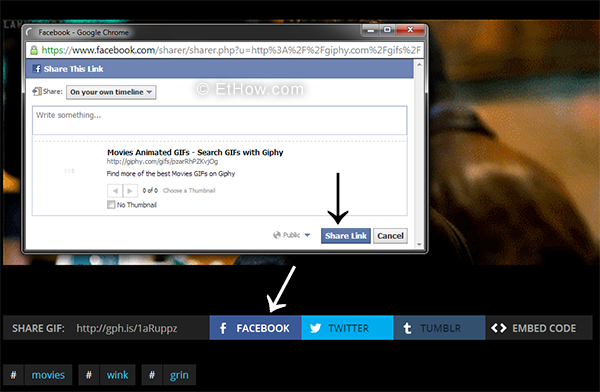
How to share animated images on Facebook?
Facebook supported animated photos known as gif photos but then they removed support for gif images and from that time, Facebook converts gif images uploaded to static images. Gifs are good way to express anything you want. Tumblr is full of gif images; it seems that gifs have taken over tumblr. Now giphy got gif support back to Facebook (I should not say gif support but a kind of). You can go to giphy and share images you like to facebook with a click. Gifs shared from giphy are not played automatically. You have to click on play button to see what that gif is saying.